


Why Professional Email Addresses Change How Outreach Lands
A business address built on your own domain, something like sales@yourcompany.ae, signals that the sender is a registered, reachable entity rather than an anonymous account. This matters more in Dubai's business culture than in most markets, where a company's digital presence is often checked before a reply is even considered. Bennellin, a SIRA-approved IT and security provider, works with organizations across the UAE to set up this kind of domain-based email infrastructure rather than leaving teams dependent on free consumer accounts.
The platform choice behind that domain email matters too. Microsoft 365 suits companies that lean heavily on Word, Excel, and Teams for daily operations. Zoho Mail works well for smaller teams that want an ad-free, privacy-focused inbox without a large software budget. Google Workspace fits teams built around real-time collaboration and cloud documents. None of these is universally better. The right pick depends on how the outreach team already works day to day.
Authentication Records That Keep Outreach Out of Spam
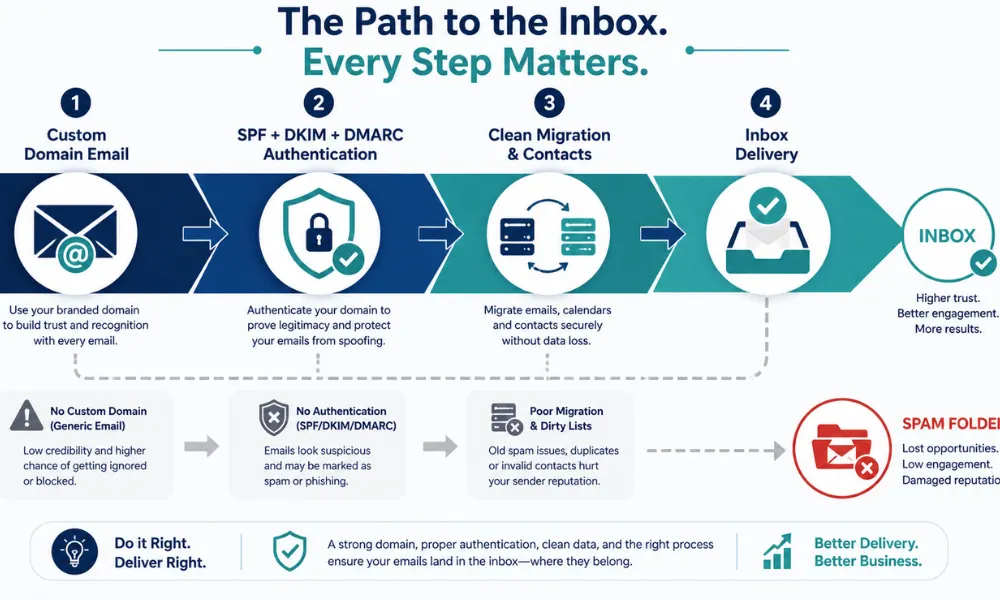
A domain address alone doesn't guarantee delivery. Outreach emails sent in bulk or in sequences get flagged fast if the domain lacks proper authentication. Three records matter here: SPF, DKIM, and DMARC. Together they tell receiving mail servers that a message actually originated from an authorized source and hasn't been altered in transit. Skipping this step is one of the most common reasons outreach campaigns from Dubai businesses end up in spam folders instead of inboxes.
Setting these records up correctly is technical enough that most in-house teams outsource it. Engineers examine existing MX records, confirm the domain's mail flow, and configure each authentication layer so outbound messages carry the credibility needed to reach a prospect's primary inbox rather than getting buried or bounced.
Migrating Without Losing Existing Contacts
Teams that already have some email history, even on a free account, worry about losing years of contacts and threads when they switch to a proper business setup. A structured migration avoids that. The process generally runs through four stages: an audit of current mail records and a full backup, technical authentication setup, encrypted transfer of folders and contacts, and finally device deployment across Outlook, iPhones, and Android devices so the team stays productive from day one.
This sequence matters for outreach specifically, because a broken migration mid-campaign means missed replies from prospects who already responded. Getting the order right protects momentum instead of resetting it.
Shared Inboxes and Admin Control for Growing Teams
Outreach rarely stays a one-person job for long. Shared mailboxes, addresses like info@ or sales@ that multiple team members can access, let a growing outreach function collaborate without buying a new license for every hire. Central admin controls add another layer that outreach-heavy businesses tend to underestimate until it's needed: the ability to revoke access instantly when someone leaves the company, which keeps prospect data and email history contained within the organization rather than walking out the door with a former employee.
Data sovereignty is worth checking too. For companies handling client information gathered through outreach, confirming that the email provider stores data in UAE-compliant data centers is a reasonable step before signing on with any platform.
Final Thoughts
Professional email addresses aren't a branding afterthought for Dubai outreach teams. They're the technical and reputational foundation that determines whether a message gets opened, ignored, or never delivered at all. A domain that matches the company name, proper SPF, DKIM, and DMARC records, and a migration process that doesn't lose historical contacts all work together before a single outreach email goes out. What does your current setup look like, and does your domain match the business behind it?
FAQ
Yes, honestly. A gmail or yahoo address gets filtered by spam systems and by human judgment faster than you'd think. Prospects in Dubai check the sender domain before they open anything from someone they don't know.
Your emails either bounce or land in spam, especially if you're sending to more than a handful of contacts at once. Mail servers treat unauthenticated domains as a risk and route messages accordingly.
A proper migration process backs up your MX records first, then moves folders and contacts through an encrypted transfer. Nothing should go missing if the audit step is done properly at the start.
Depends on your workflow. Teams already living in Word and Excel usually prefer Microsoft 365. Budget-conscious startups often go with Zoho. Teams that collaborate constantly in the cloud tend to lean toward Google Workspace.
It helps with local SEO and signals that your company is physically present and regulated in the UAE, which builds a bit more trust with local prospects reading your outreach emails.